Lesson 2.2: Details of AR Technology
What is Augmented Reality (AR)?
Augmented reality (AR) is an XR system that overlays digital sensory information - of sound, videos, graphics- on the real world objects in real time. The digital sensory information is combined with the real world data in a way that alters the perception of the real-world environment, allows the user to go beyond the screen and, experrather than replacing it as in VR.
AR experiences can be delivered via desktop computers, mobile devices such as smart phones and tablets, and head mounted displays (headsets, goggles or glasses). Currently, the most common type of AR is delivered through mobile devices such as tablets and smart phones.
AR experiences must have these three features:
- a combination of real and virtual worlds
- real-time interaction, and
- an accurate and realistic 3D rendering of real and virtual objects.
Brief History of AR
While the term AR has been recently coined, actual AR technology has been around since the 1950s. Head-up displays were developed in the 1950s for airplane pilots, projecting flight data onto their line of sight so that they did not have to look down at the instruments. In the 1960s Sutherland and Bob Sproull created an AR head mounted display (See video below).
Provided ID could not be validated.
The term AR was coined in 1990 by Thomas Caudell and David Mizell who were Boeing company researchers. As a solution to the expensive diagrams and marking devices that were used to guide workers on the factory floor, they proposed replacing the large plywood boards with a head-mounted apparatus that would display specific schematics through high-tech eyeware and project them onto multipurpose, reusable boards.

In 1992 Louis Rosenberg of the US Air Force created the AR system called “Virtual Fixtures” which provides an overlay of virtual sensory information on a workspace in order to improve human performance in direct and remotely manipulated tasks. For example, to help draw a straight line on paper using a free-hand can be challenging, but if the image of a ruler was overlaid on the paper, the user can typically draw it quickly and accurately. On the left is an example of a Virtaul Fixture used to guide surgeries.
In 2013 the Google Glass was introduced, in 2015, Microsoft presented two brand new technologies: Windows Holographic and HoloLens (an AR goggles that display HD holograms). None of these took off in terms of user adoption as expected, although applications in specific industries such as assembly lines, manufacturing, training have been significant. The game changer for AR was the 2016 game Pokemon Go game for mobile devices, which used location based AR technology where gamers had to look for and interact with their Pokeman characters in various parts of the world. The app was a megahit, and helped to propel awareness of AR in other applications.
Since then, AR has been adopted and continues to grow in use across industries. The global AR market is expected to grow at a CAGR of 37.5% through 2025 and the AR glasses market is expected to grow at CAGR of 109%.
Types of Augmented Reality Interfaces
a. Image-based or Marker based AR, relying on image recognition which can be a QR code, text or image. The user points a camera (e.g., mobile device) directly at an object or a marker placed on an object (e.g., a QR code), which triggers multimedia content (Figure 2) such as images and sounds to appear on the device screen. In some cases, the AR device will calculate the position and orientation of a marker to position the content. Using this method, images in a textbook may be shown as 3D models, or a picture or QR code of a house might take you to a 360 video of the house or a map. A fascinating example of this is the “A Spirit of Electricity” art display at the City of Paris Museum of Modern Art.
This room sized painting, shows the history and work of 108 inventors of various facets of electricity. Visitors can learn about each inventor or the invention that they are interested in by pointing a mobile device to the area of the painting that is of interest.
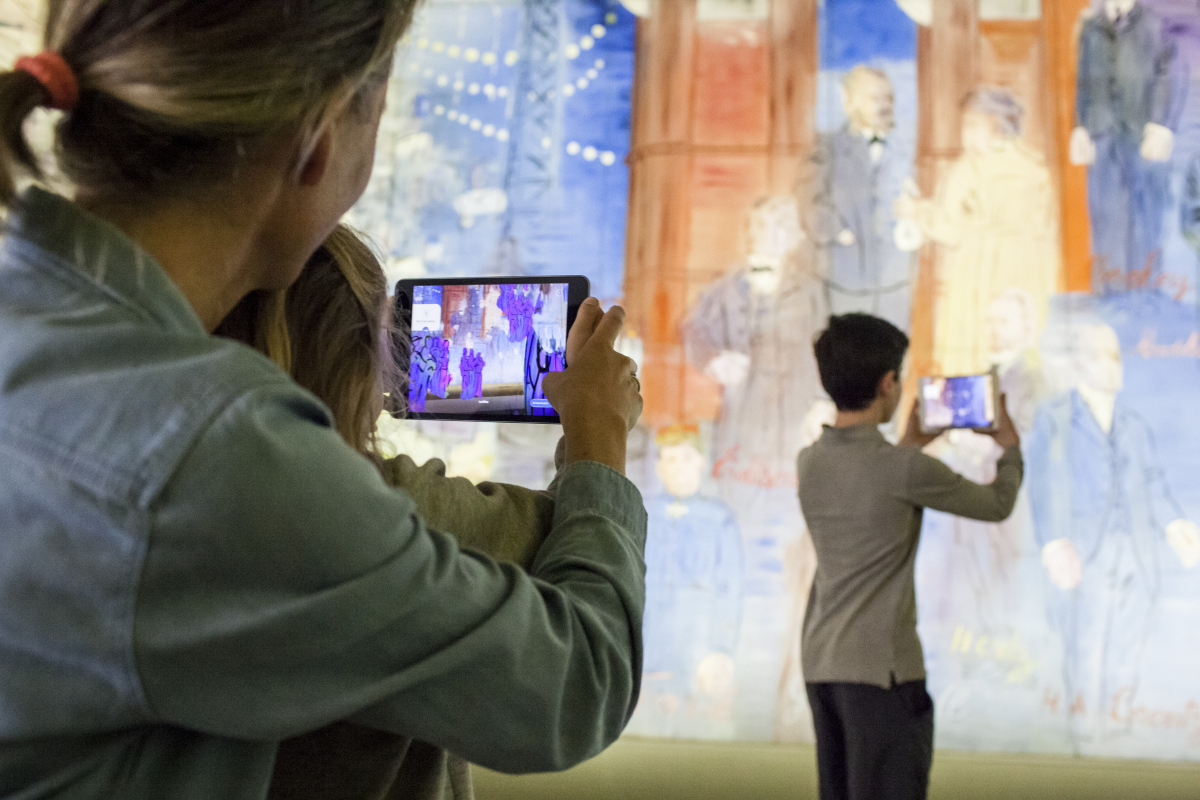
A more down to earth example is a real estate app called Street Peek that lets you get information about the houses on the street and neighborhood that you are considering, by just pointing your phone to the image of the property or object.
The Visible Body app, used to teach biology and the human body, is another example of marker based AR. See the video below for a demo.
.
b. Marker less/Location-based/Geo AR.
Markerless AR refers to a software application that doesn’t require prior knowledge of a user’s environment to overlay virtual 3D content into a scene and hold it to a fixed point in space. This eliminates the need for capturing physical markers to trigger virtual interaction. With a map of the area, an AR-enabled application can place virtual objects into a real context and have them remain stationary without the need for a target image. The technology depends on flat, textured surfaces to successfully render virtual images. An example of an application would be in in interior Design: You could see how a new appliance might look in your kitchen or a new piece of furniture in your living room. To do this, you would use a mobile device to scan your kitchen or living room, and virtually place an appliance or couch in the place that you are considering.
Provided ID could not be validated.
Location-based AR merges virtual 3D objects into the user’s physical space. This uses the GPS and a camera to embed digital information on the real world based on the user’s current location. The highly successful video game Pokémon GO is based on Geo AR. Players from all over the world use the app to discover digital Pokémons attached to specific points of interest as they explore the world around them.
Augmented Reality Devices
To superimpose images on current environments, AR technology needs four components
- Cameras and sensors (eg: accelerometer, GPS, solid state compass): to detect an image’s features and depth, user's interactions, scanning the surroundings and using this info to locate physical objects and generate 3D models to determine the real object that is being augmented, or calculate the distance between two objects ( for eg when measuring eyeglasses for fit) before superimposing digital content.
- Projection and reflection of virtual media: they add virtual information over what a user sees. For example, a video or 3D graphic can be projected atop an image or a marker when it is selected.
- Processing and transmitting data: AR devices work like computers and require a CPU, GPU, flash memory, RAM, Bluetooth, wi-fi, GPS etc. (smart phones have all these processors) the digital information is accessed by means of an app, it needs to be transmitted through wireless networks to the device several times as the user is interacting with the system in real time. Sufficient bandwidth, powerful mobile device processing and storage capacity are necessary for exploring AR’s full potential.
Smartphones and tablets, Google Glass and other wearable devices already have most of these features, and are being used for AR experiences. are most commonly used for AR experiences.
Devices suitable for Augmented reality:
- Mobile handheld devices (smartphones and tablets) – most commonly used for applications where a hands free experience is not crucial.
- Head Up Displays (HUD), sending data to a transparent display directly into user’s view. These displays have become standard across many automobiles. (See video below)
Provided ID could not be validated.
- AR glasses – Oculus, HoloLens, Google Glass, etc. These are wearable glasses that add extra information such 3D images, animations & videos, to the real-world scenes by overlaying the digital information on top of the real world information. They can get notifications from computers, smartphones, or other devices and are WiFi, Bluetooth, and GPS enabled. Click here for a comparison of the latest AR glasses in the market.

AR Glasses in use in manufacturing. Source: Leading Augmented Reality Development Kit Company | AR SDK & AR Kits (dynabook.com)

- AR contact lenses (or smart lenses) Manufacturers like Samsung and Sony, Mojo Vision have announced the development of AR lenses that function like AR glasses but more "invisible".

Assessment & Reflection

Can you think of some advantages and challenges of using Smart Glasses and Smart Lenses to experience AR? Given the choice between a handheld device and a wearable device (like the glasses or lenses), which would you prefer? Why?
NEXT: ONLINE QUIZ 2: Answer the five questions in this online quiz to test your understanding of AR technology.
NEXT Lesson 2.3: AR Applications in Education