Creating a GoTo Training Account
- Go to the GoTo Training Website
- You'll have the option to either use the 30 day trial or purchase a license. For purposes of this course we'll use the free trial
- Go through the steps to create your own account. This will be used for later exercises.
- Tips for creation
- You will only need one organizer, and you should use a personal email address.
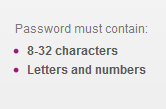
You will need to create a secure password: please follow the directions carefully. - You will need to enter billing information, however they will send you an email a few days before they would begin billing, so that you'll be able to cancel the account.
- GoTo Training will then prompt you to schedule a training.
- Tips for creation
- Go to the GoTo Training Website


Let's get started!
Go back to lesson 1